AdapTable for AG Grid 24.0
Ask questions of AG Grid in a single, powerful, unparalleled query language, watch how data changes over time, act on every row and manage AdapTable in DevTools
AdapTable 24.0 is the latest version of our market-leading AG Grid extension.
It is a major release and supports AG Grid v.36.2
Breaking Change
- Version 24 includes breaking changes — primarily around Expressions
- Consult the AdapTable 24.0 Developer Release Note & Upgrade Guide for the full list of changes
AdapTable 24 puts more power in the hands of the people who rely on their Grid — whether they click a button on the row, or ask a question of the data.
We have rebuilt AdapTableQL so there is one clear, flexible, powerful and human-readable language for asking those questions — from a simple filter to the highest price today.
Action Columns turn every row into a workspace. Observable Expressions let Calculated Columns and Alerts watch how values change over time, not just what they are right now.
And we are delighted to unveil AdapTable DevTools: a Chrome extension that lets you inspect, restore and restyle a live instance, so you spend your time improving the Grid, not reconstructing it.
AdapTable 24 has a three-pronged central focus:
- less custom Grid code for developers to write
- more of the workflow sitting on the row for run-time users
- an even more powerful expression library and query language for advanced users
| What we shipped | Why it matters |
|---|---|
| Refactored AdapTableQL | One flexible and extensible Query Language for filters, formats, Alerts and Calculated Columns |
| Observable Calculated Columns | Live columns from change history — highest today, quiet for 20 seconds, percent move |
| Relative Change Alerts | Tell the desk when a value moves, not only when it crosses a level |
| Formula Trace | Click a Calculated Column and see how the number was made |
| Action Columns | Buttons, toggles, links, menus and more on every row — without writing a cell renderer |
| Extended Layouts | Mark Formats, Styles and Alerts as belonging to a specific Layout |
| Grid Settings | Improved UI so run time users can be more productive |
One Language for the Grid
Every serious AG Grid user ends up asking the same kinds of question: which rows matter, when should I be told, and what should this cell look like?
In AdapTable 24 those questions share one, powerful engine: AdapTable Query Language.
This has been signficantly enhanced and fully replaces the (previously used) Predicates.
Filters, Format Columns, Flashing Cells, Alerts, Reports and Calculated Columns all speak it.
Users learn the language once and then apply it in multiple places.
Scope
-
A new Scope function is the manager-friendly version of "do this to every column of this type".
-
One simple rule can include columns in scope, including those added later which match.
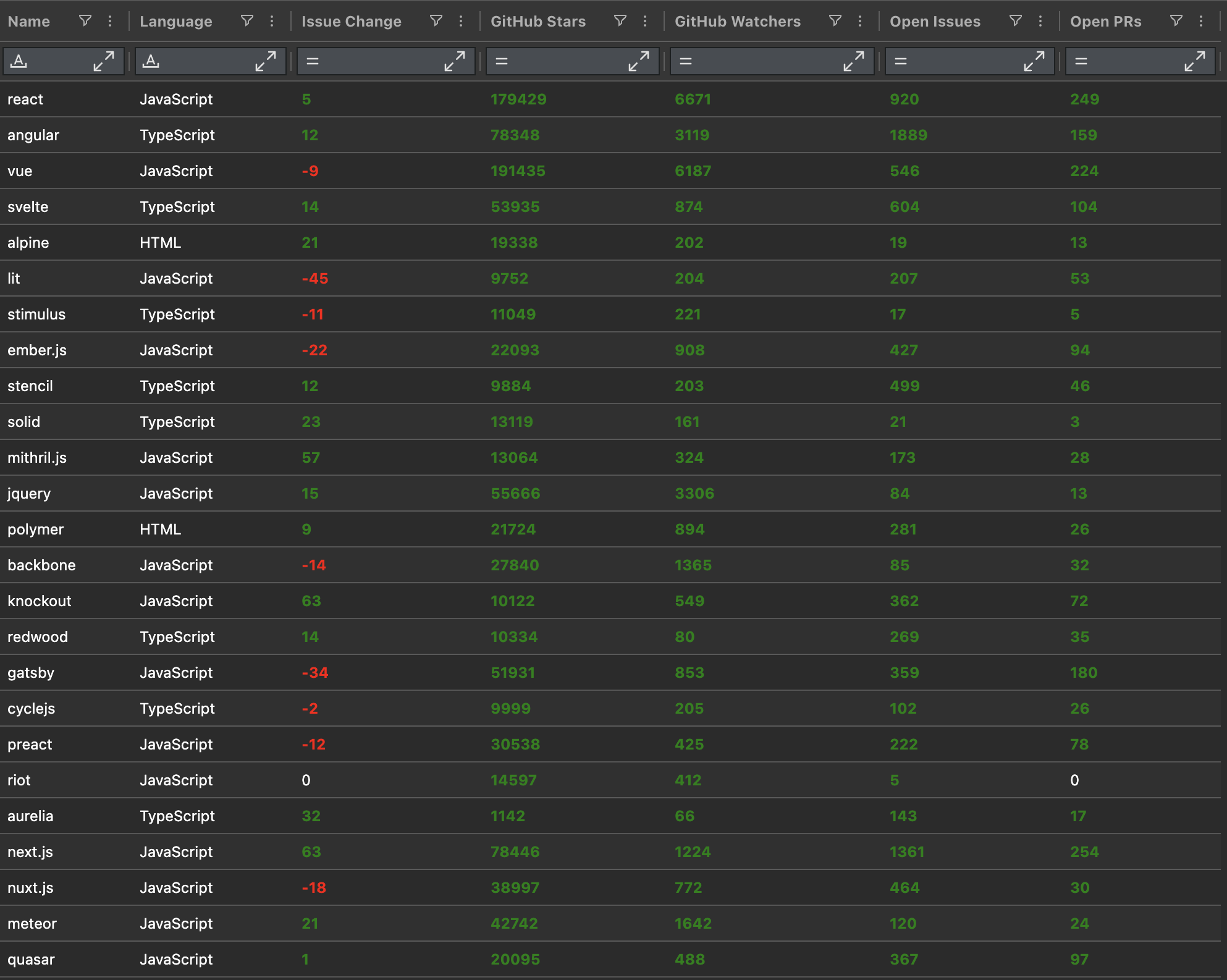
// Create a Format Column which paints all Positive Numbers as Green
FormatColumn: {
  FormatColumns: [{
    Scope: { DataTypes: ['number'] },
    Style: { ForeColor: 'Green' },
    Rule: 'IS_POSITIVE($SCOPE)',
  }],
}
Named Queries
-
Named Queries can now return any value, not only true / false.
-
AdapTableQL uses the
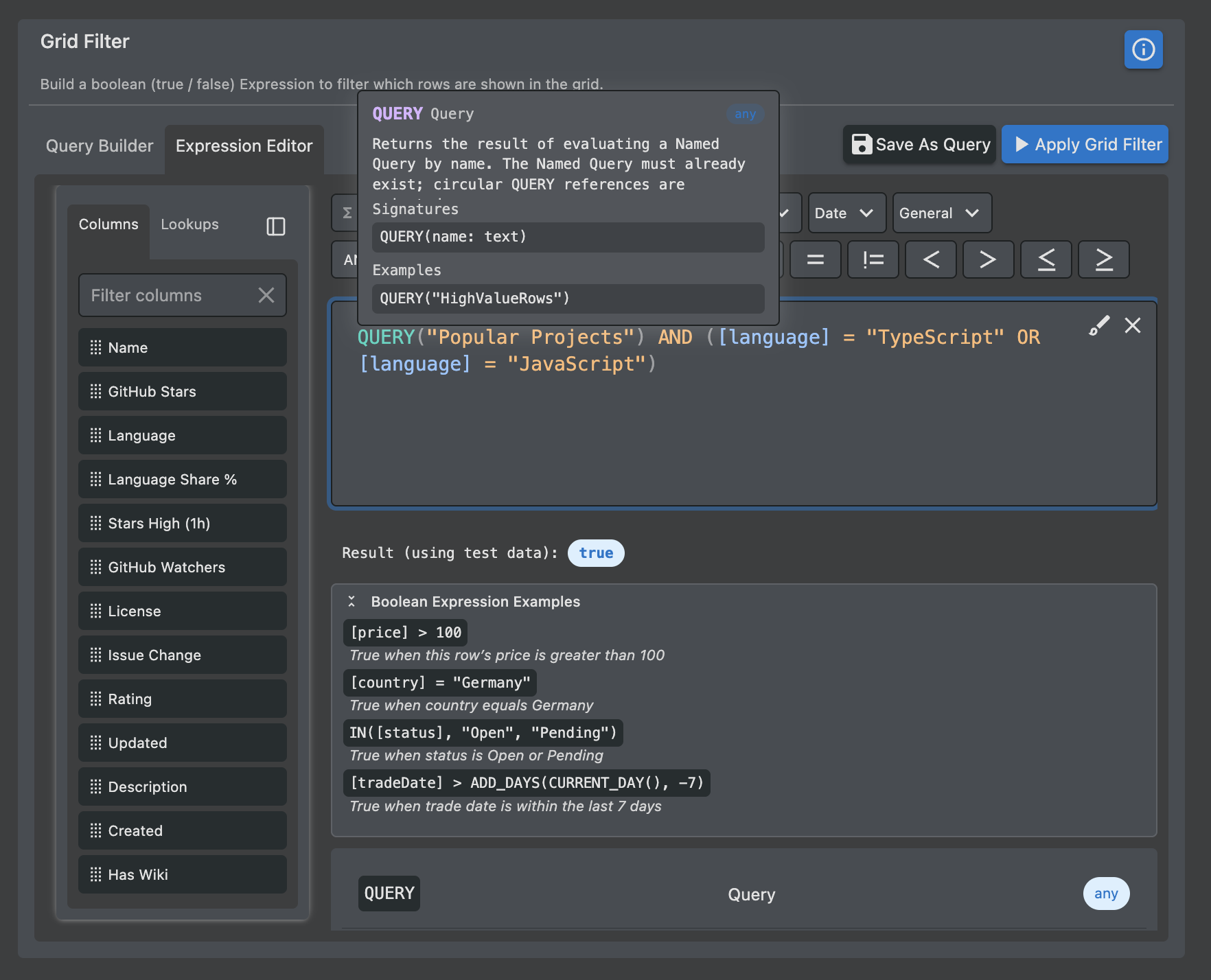
QUERYkeyword to reference these Named Queries in Expressions
// Define 3 Named Queries - which are then reused in a Calculated Column, Layout & Conditional Style
// Note: One of the Named Queries references another (chaining is allowed)
const initialState: InitialState = {
  NamedQuery: {
    NamedQueries: [
      { Name: 'US Banks', Expression: "[cpty] IN ('BAML', 'Citi') AND [bid] > 3" },
      { Name: 'Big US Orders', Expression: "QUERY('US Banks') AND [orderSize] > 100" },
      { Name: 'Popularity Score', Expression: 'PRODUCT([price], [vat], [extras])' },
  ]},
  Layout: {
    Layouts: [{
      Name: 'Simple Layout',
      TableColumns: ['price', 'change', 'packageCost', 'popularity-score'],
      GridFilter: { Expression: "QUERY('Big US Orders')" },
    }]},
  FormatColumn: {
    FormatColumns: [{
      Name: 'US Banks Style',
      Scope: { All: true },
      Style: { FontWeight: 'Bold' },
      Rule: "QUERY('US Banks')",
    }]},
  CalculatedColumn: {
    CalculatedColumns: [{
      ColumnId: 'popularity-score',
      Expression: "QUERY('Popularity Score')",
    }]},
}
Custom Functions
-
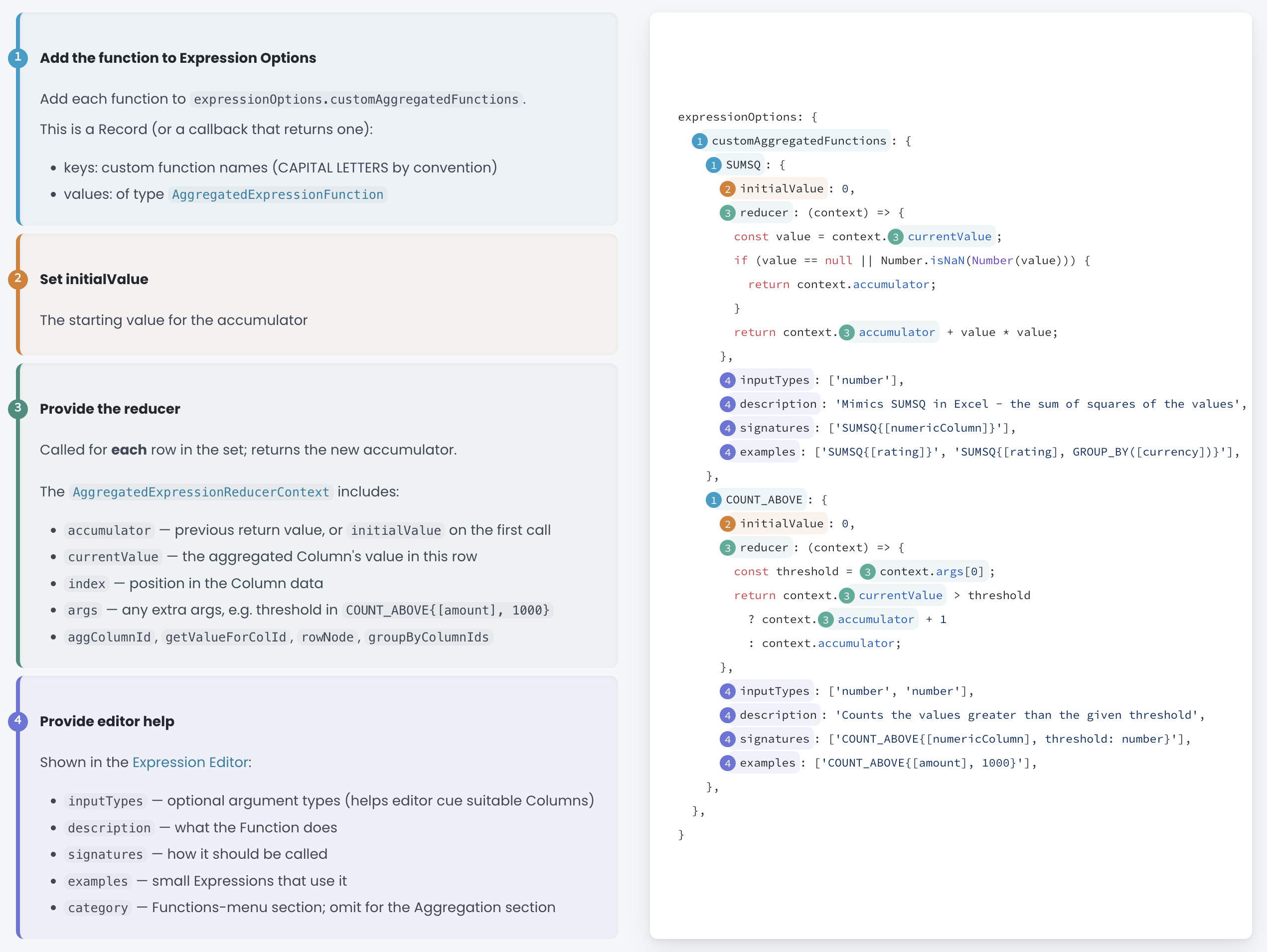
AdapTable 24 makes it easier for developers to provide Custom Expression Functions
-
They will be added to the many functions provided by AdapTable and made available to end users
Hint
Advanced teams can supply an entire custom analytics library and makde it available in the grid
- Additionally Custom Aggregation Expression Functions have been enhanced to allow power users to create very complex multi-row functions
UI Editors
-
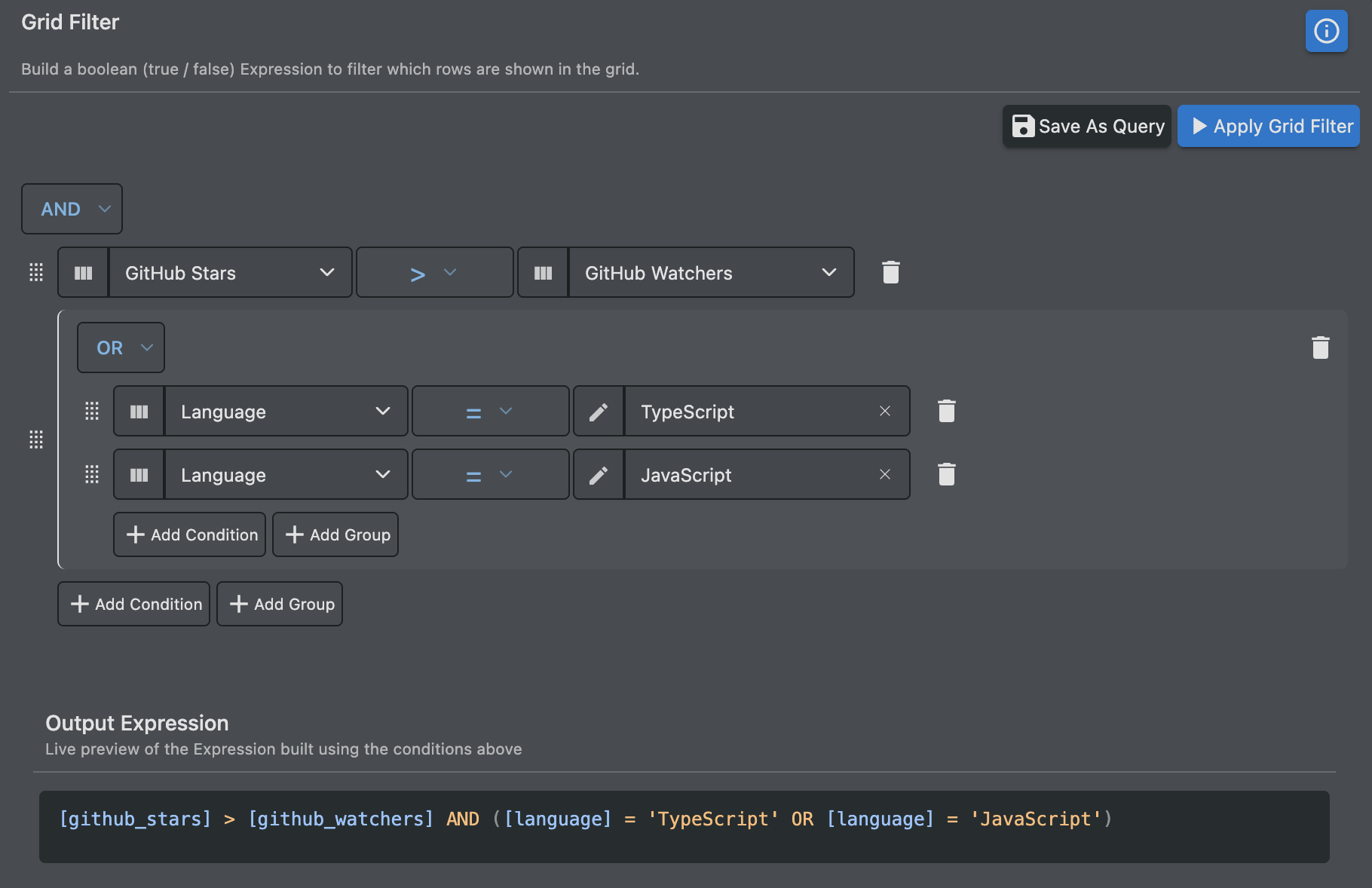
AdapTable 24 provides major improvements to the 2 UI editors used to create Expressions:
-
Query Builder - for users who do not want to write syntax - has a much cleaner interface
- Expression Editor — for power users - has autocomplete, hover help, 1-click fixes and examples
Watch How Data Changes
A snapshot of the Grid tells you what a cell is.
Trading, ops and risk teams also need to know what it did.
Which is why v.24 includes improved Observable Expressions and new Relative Change Alerts.
Observable Expressions read change history (and time) and return a live value.
In v.24 they are no longer limited to Alerts and can now drive:
| Feature | Typical questions |
|---|---|
| Observable Calculated Columns | What is the high / low in the window? How many times did this cell tick? How old is this row? |
| Alerts | Has this price gone quiet for 20 seconds? Has anything moved in the last n seconds? |
| Conditional Styles | Which cells have changed 10 times in the last hour? Which values are the lowest today? |
| Flashing Cells | Is this the highest value today? How many ticks in the last 5 minutes? |
Relative Change Alerts sit beside that and add further richness.
These Alerts fire on the nature of a move — any change, a percent move, or an absolute move.
This means that the desk can be told when price jumps 5%, not only when it crosses a static level.
Note
Alert actions can now be batched - a burst of ticks produces one Alert, not fifty
Calculated Columns
Calculated Columns are how AdapTable turns a Grid into a model.
They are derived values that stay in sync as the row ticks.
Version 24 extends the set of Calculated Column Expressions.
Window and Observable join the existing Standard, Aggregation, Cumulative & Quantile types.
So a column can be "this row", "this row over time", or "this row compared to its neighbours".
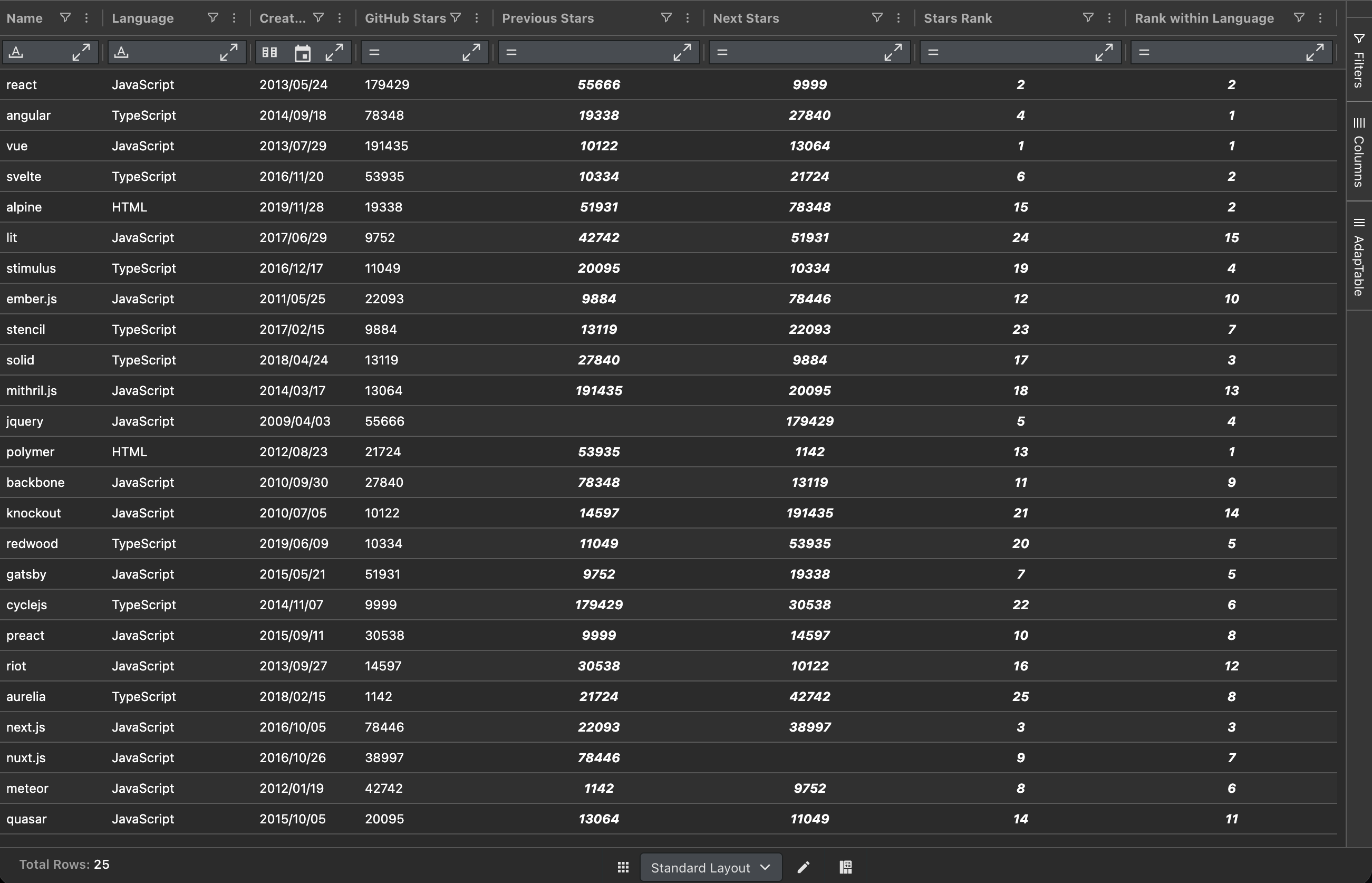
Window Calculated Columns do that last job: they order the rows and look up a value from another row in that series — the previous trade, the next one, the first or last, or this row's rank.
Thus the Grid can show "change versus previous row" or "rank in book" without a custom renderer.
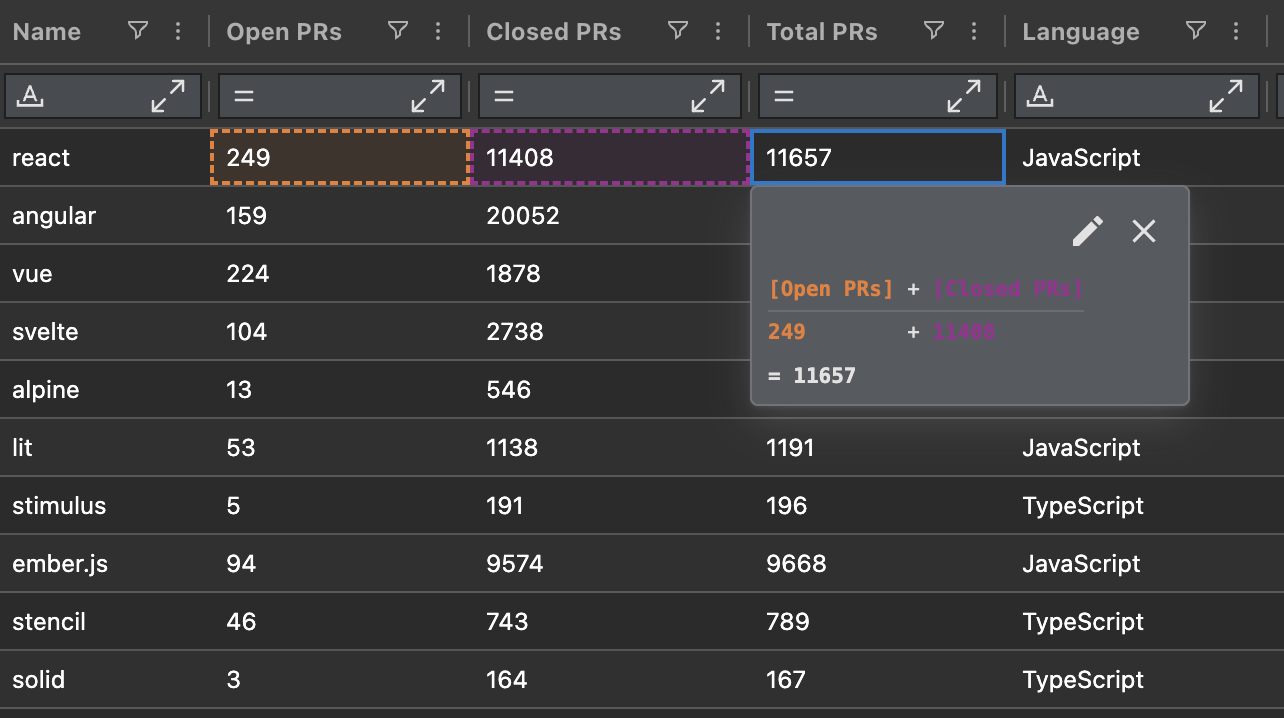
Just as important for the people who inherit the Grid: they can now see the working:
- Formula Trace shows how each value was derived
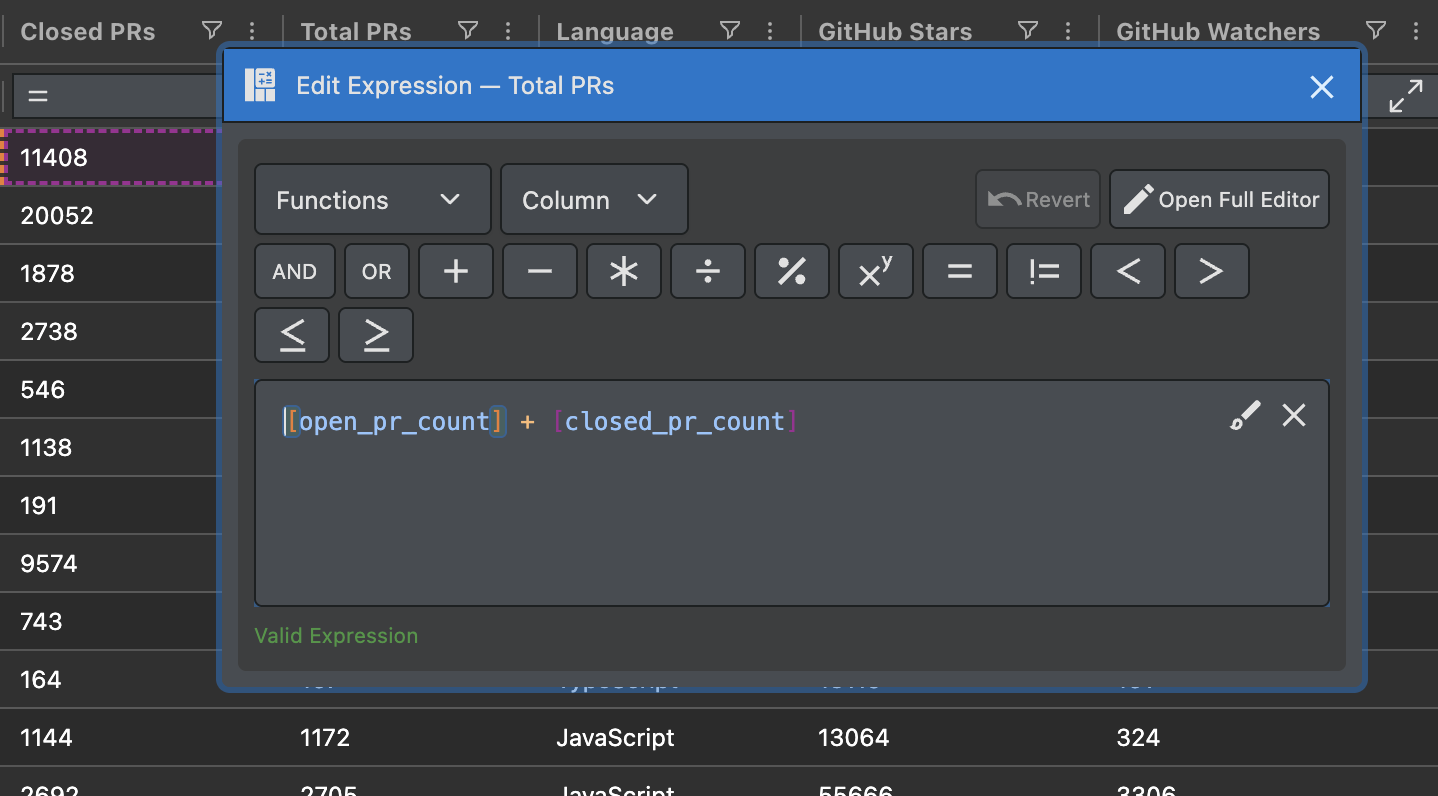
- The Compact Expression Editor allows users to edit Calculated Columns via a popup
- The cell tooltip lists the formula and the run-time inputs
- AdapTable stops you deleting a Calculated Column that something else still uses
Hint
- Aggregated Calculated Columns are far more expressive too in v.24
- e.g. filter inside the aggregation (
USDonly), weigh a running VWAP, or show a row as % of its group
Action Columns
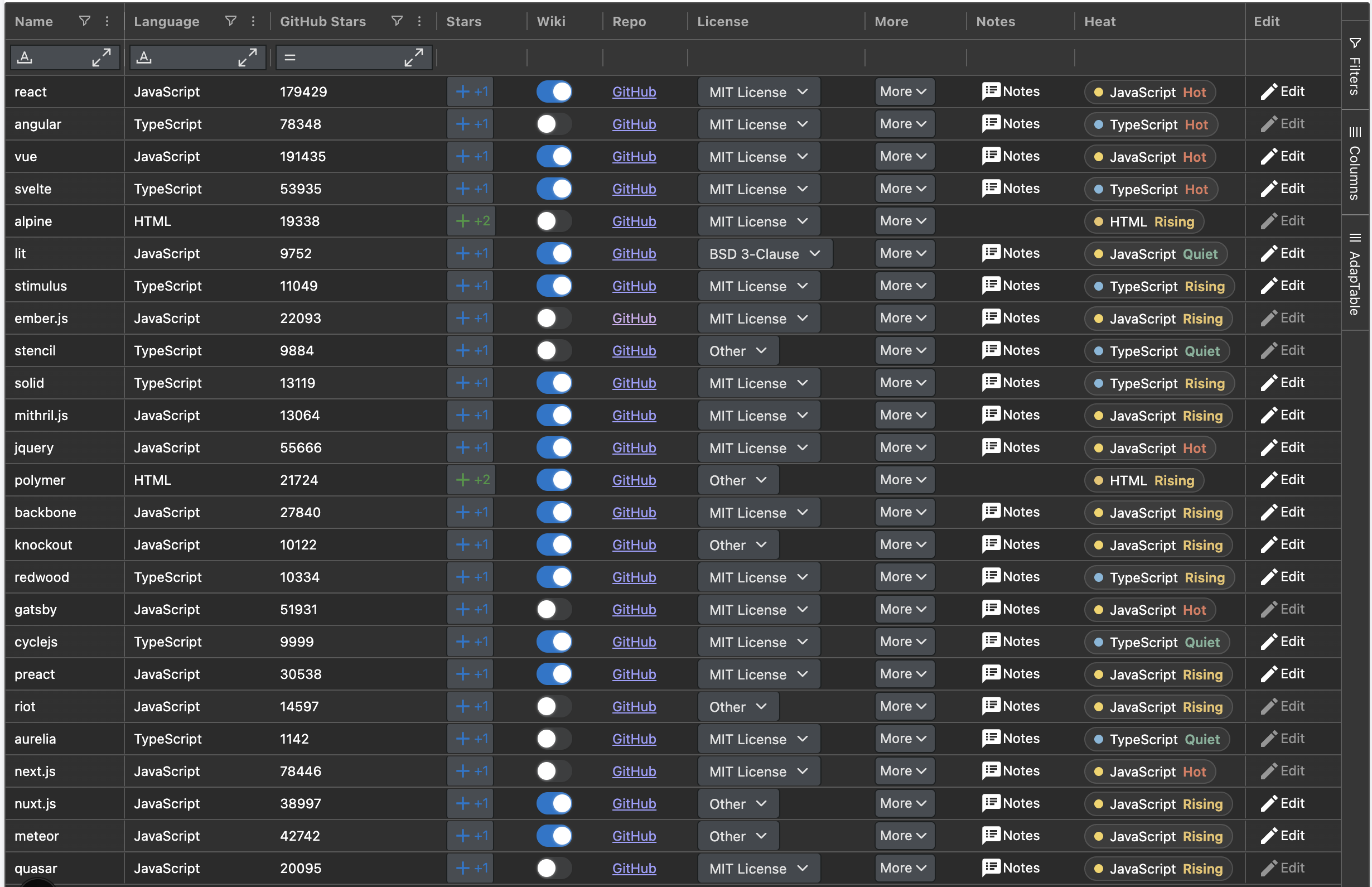
Action Columns are a good example of what AdapTable does best: help developers and end users design complex, powerful AG Grid functionality with a minimum of effort and custom code.
They are design-time columns that host interactive Controls on every row.
This allows users to act on the data they are looking at — flip a flag, open a record, pick a status, jump to a URL — without hunting in a toolbar or leaving AG Grid.
Version 24 redesigns them around 8 Control types:
type | Control | What the user gets |
|---|---|---|
button | Button | A clickable button with your action |
toggle | Toggle | A switch or checkbox bound to a boolean |
link | Link | A hyperlink built from the row |
select | Select | A dropdown that writes a chosen value |
command | Command | Built-in Edit / Clone / Delete / Create Row Forms |
menu | Menu | A dropdown (or split button) of other Controls |
form | Form | An Adaptable Form in a popover |
custom | Custom | Your own React / Angular / Vue / HTML content |
Each Control receives the row, the node and the Adaptable API.
Labels, icons, styles & visibility can all be functions, so the same Column can look different per row.
Find Out More
The Action Columns blog post explains more about all 8 Action Column Controls, with a live demo
Improved User Experience
AdapTable v.24 includes UX enhancements to Grid Settings, Notes and Layouts.
Grid Settings
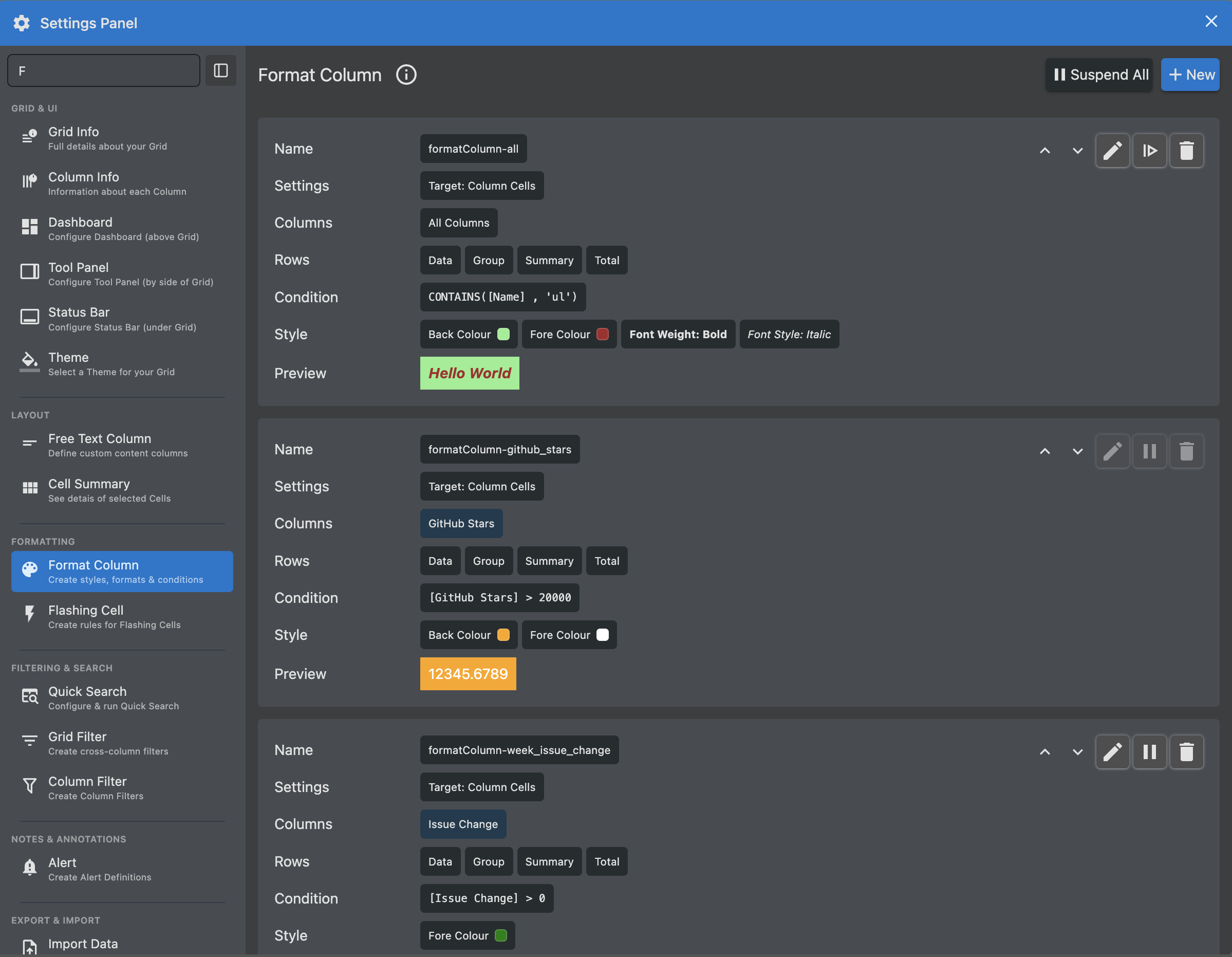
- The Settings Panel is now presented to users as Grid Settings
- The button to open it (the icon can be custom) now lives on left hand side of Dashboard header
- The navigation can search, collapse to an icon rail, and show a one-line description per module
- Cell Summary, Smart Edit and Bulk Update now live in Grid Settings (no more popups)
- More grid and column related information added to Grid Info and Column Info panels
Notes
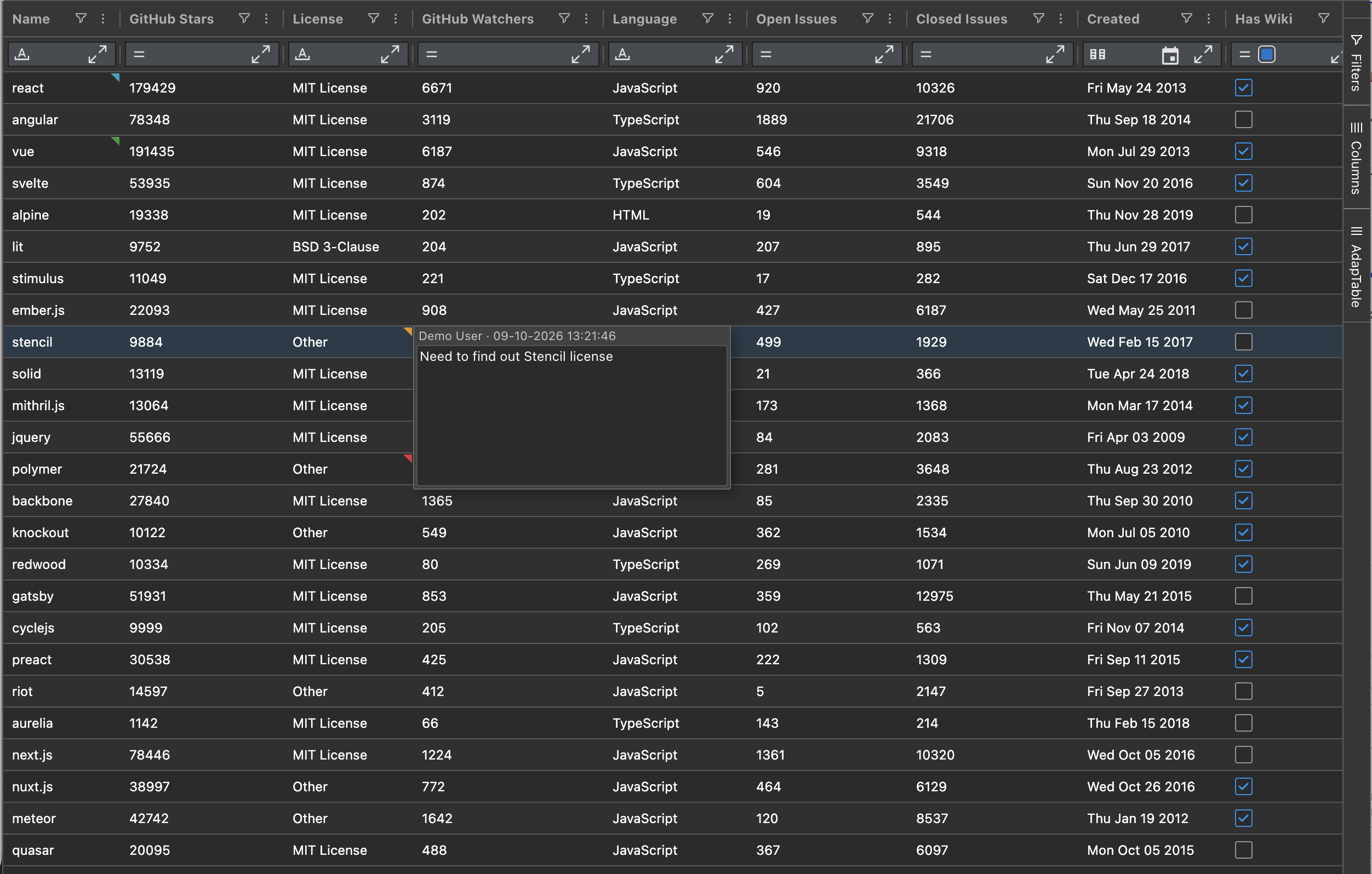
- Notes now builds on AG Grid's Cell Notes (in place of the previous custom implementation)
- AdapTable adds the extras that teams already expect (types, defaults, the rest of the workflow)
Note
The parallel Comments feature, which enables cross-team notes and collaboration, is unchanged
Layouts
- In v.24 Developers can ask AdapTable to create a Default Layout using AG Grid properties
Note
- The most common complaint in our recent user survey was the need to always provide a Layout
- This is most annoying when Layouts simply mirror AG Grid ColDefs, causing unnecessary duplicated effort
-
Another user-requested enhancement is improved Layout Extensions.
-
Developers can now more easily pair a Column Format, Filter or Alert with a Layout
-
And an added benefit is that Team Sharing takes that pairing with it
AdapTable DevTools
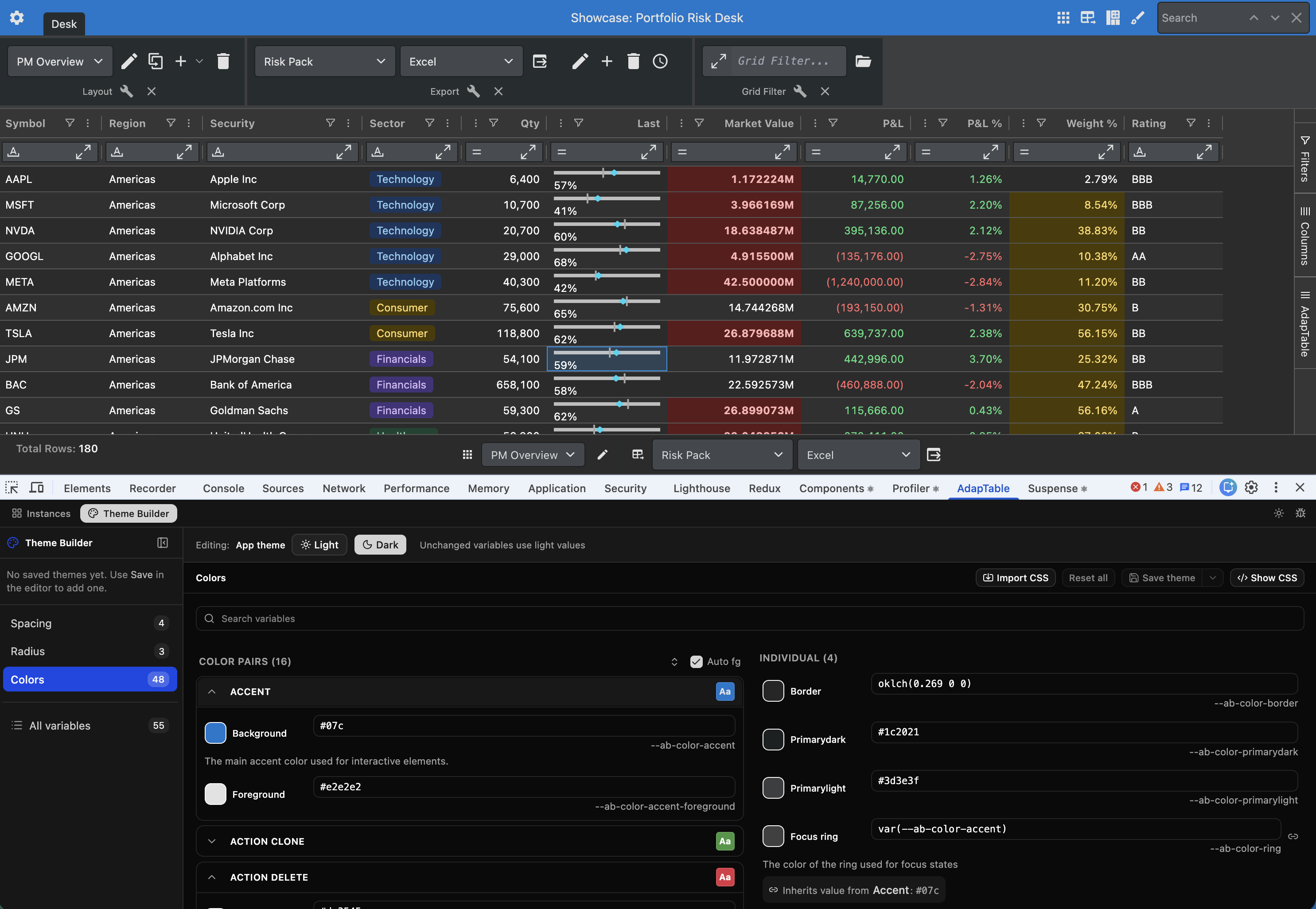
AdapTable 24 formally launches AdapTable DevTools — a Chrome Developer Tools extension for every page that runs AdapTable.
Developers and support can, without writing diagnostic code:
- inspect a live instance
- restore State snapshots
- read logs
- design themes
Note
- Install AdapTable DevTools from the Chrome Web Store
- Open the AdapTable tab, and you have a control room beside the your AdapTable instance
Find Out More
The Introducing AdapTable DevTools blog post covers what the tool does and why we built it
Get Started
If you are an existing AdapTable user, download the latest version from npm.
Like all AdapTable releases, v.24 is available in 4 framework flavours:
- TypeScript (the default)
- AdapTable React
- AdapTable Angular
- AdapTable Vue
If you are not yet using AdapTable, please get in touch to learn how AdapTable extends AG Grid to help you access, manage, edit and visualise your data in ways no other DataGrid solution allows.
You can also download a free no-obligation trial licence so you can try out AdapTable for yourself.